Google Calendar as an LLM orchestrator
Automating marketing with Google Calendar and LLMs
Most of marketing is invisible grunt work.
SEO & GEO reports. Competitor monitoring. Content performance checks. Citation tracking. Weekly analytics summaries.
Most of this is not creative or always strategic. But it still takes time even with all the new fancy LLM toys.
AI assistants help. I use Claude etc. constantly. But here's the friction: every time I need to run a recurring analysis task, I have to remember to do it, open the chat, re-explain the context, and wait for results. The cognitive overhead adds up.
There are many productivity tools available. Then Clawdbot. OpenClaw. Various "agentic" schedulers. You can spin up a complex solution with Cursor. But they all require learning a new interface or work with CLI, setting up workflows, and maintaining yet another system. For basic recurring tasks, it feels like overkill.
So I built something simple.
What if the calendar was the interface?
Calendars are already where I schedule everything. Meetings. Deadlines. Reminders. What if the calendar could also schedule AI tasks?
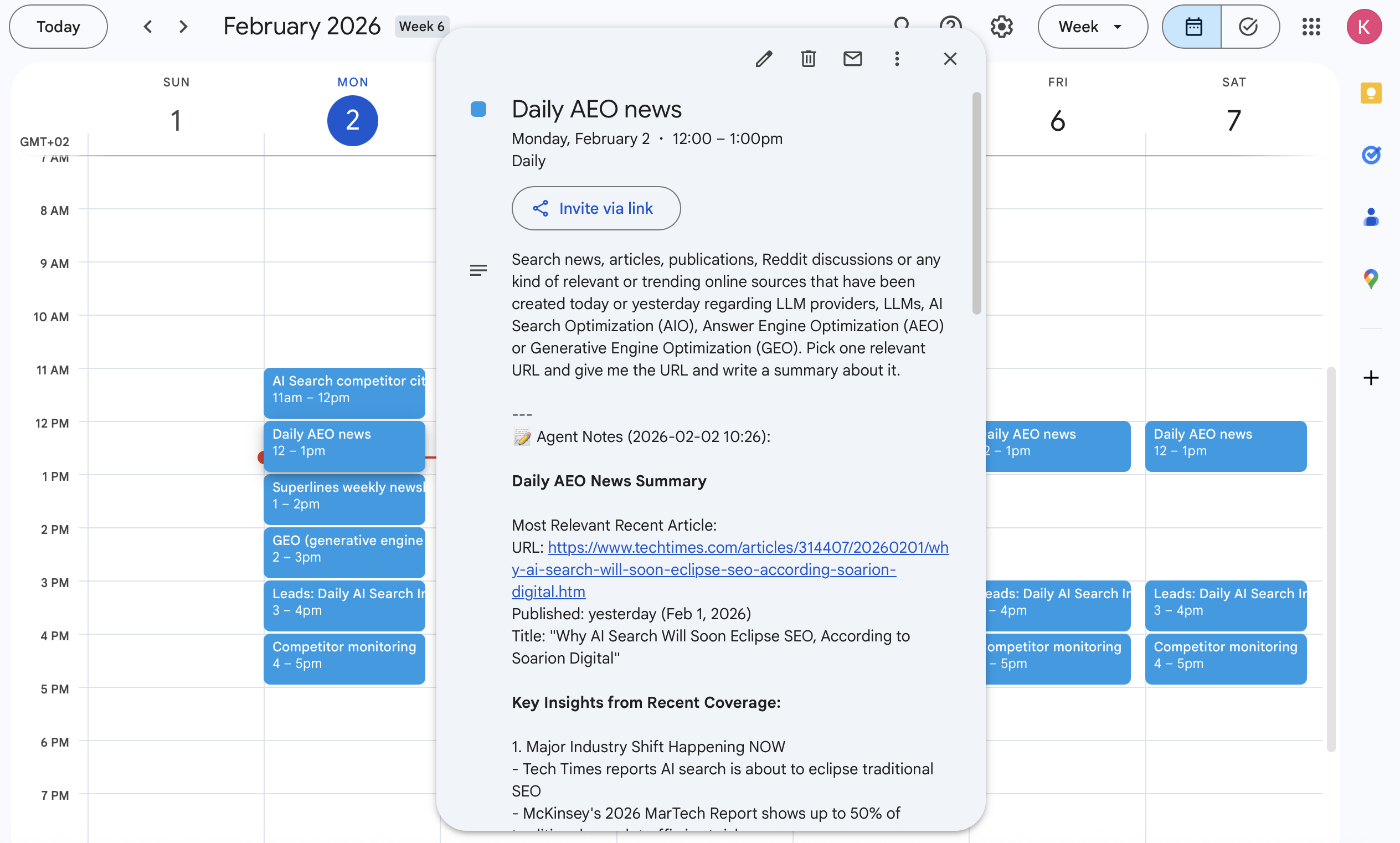
The idea: create a dedicated Google Calendar for AI tasks. Write your prompt in the event description. At the scheduled time, an agent picks it up, executes it with Claude and MCP tools (SEO, GEO, search, marketing data etc.), and writes the results back into the event notes.
That's it. No new interface. No complex workflow builder. Just a calendar where every event is a task for the AI.
How it works
The architecture is deliberately simple:
1. Dedicated calendar for tasks
I created a separate Google Calendar just for agent tasks. Every event on this calendar is a prompt:
Title: Weekly GEO Report
Description: Analyze our website's AI search visibility this week.
Compare with previous weeks and identify trends.
2. Bot polls the calendar
A Python daemon checks for upcoming events. When it finds one in the processing window, it extracts the prompt from the title and description.
3. Claude executes with MCP tools
The agent has access to real tools:
- Web scraping (Oxylabs, Bright Data)
- Search (Google SERP via Oxylabs)
- Analytics (Superlines for AI search visibility, DataForSEO for keyword research)
- Documentation (Context7 for API lookups)
It's not just answering questions—it's actually doing research.
4. Results saved back to the event
The agent's response gets appended to the calendar event description with a timestamp:
---
📝 Agent Notes (2026-02-02 09:00):
AI Search Visibility Report for week of Jan 27-Feb 2:

Brand visibility increased 12% week-over-week...
[full analysis follows]
5. Recurring events have memory
For recurring events (weekly reports, daily checks), the agent retrieves previous notes and uses them as context. It builds on past work instead of starting fresh.
The MCP stack that makes it useful
The agent isn't just a ChatGPT wrapper. It has actual tools:
| Category | Tools | What it does |
|---|---|---|
| Web Scraping | Oxylabs, Bright Data | Scrape any URL, bypass bot detection |
| Search | Oxylabs AI Search | Google results with optional content extraction |
| AI Analytics | Superlines | Track brand visibility in ChatGPT, Perplexity, Claude |
| SEO | DataForSEO | SERP analysis, keyword research |
| Docs | Context7 | Look up library documentation |
When I ask it to "analyze our competitor's pricing page," it actually fetches and parses the page. When I ask for keyword research, it queries real SEO APIs.
Tasks I now schedule instead of doing manually
Here's what's running on my calendar right now:
Daily (8:00 AM):
AEO News Digest— searches for trending articles, Reddit discussions, and news about AI Search Optimization, Answer Engine Optimization, and GEO from the past 24 hours. Picks one relevant source and summarizes it.
Daily (14:00):
Competitor Monitoring— scrapes product updates, new features, and launches from competitors in the AI Search Visibility space (Profound, Searchable, Semrush, Ahrefs, Peec AI, etc.)Sales Lead Generation— picks a random brand from our AI search data, analyzes their visibility insights, scrapes their website, and drafts personalized outreach (email + LinkedIn versions)
Weekly (Monday 9:00 AM):
Citation Gap Analysis— finds prompts where we're cited, identifies the top competing URL dominating that query, scrapes it to understand why it ranks, then suggests improvements to our own content based on GEO best practicesNewsletter Draft— scrapes our latest published article and transforms it into a newsletter format
Weekly (Wednesday 10:00 AM):
GEO Article Generation— searches trending discussions about AEO/GEO on Reddit and forums, identifies a topic we should cover, pulls internal data from our analytics, scrapes external sources for supporting insights, and drafts a full article matching our existing style
The results sit in my calendar. I can review them during my morning routine. No extra dashboard. No context switching.
The code
The entire implementation is:
main.py— Event loop that polls calendar and orchestrates processingcalendar_client.py— Google Calendar API wrapperagent.py— Claude agent with MCP tool definitionsstorage.py— SQLite for persisting notes and memoryapi_clients.py— Direct API fallbacks when MCP isn't available
Run it locally with a cron job. Or in Docker on Fly.io.
The Google Calendar API handles authentication, recurring event management, and synchronization across devices. I didn't have to build any of that.
The unsexy future
There's a gap between "AI can do amazing things" and "AI is doing amazing things for me every day."
The gap isn't intelligence. It's integration. How does the AI know what to do? How does it remember context? How does it fit into existing workflows?
I'm not claiming this is the future of AI orchestration. It's probably too simple for complex workflows. But for the boring, recurring, "I just need this to happen every week" tasks?
It's working.
"General" version repo: I created a general version of the code and it's here github.com/ihmissuti/google-calendar-agent. Setup takes some minutes if you already have Google Calendar API credentials.
